A close finish. A clear result.
Turn your phone, tablet or computer into a photo-finish tool. See the order across the line, read each finish time and keep a result you can show your athletes. Built for coaches, clubs and anyone who wants more from a training session or a race.
Try Photo-finish in your browser or choose an app for your device.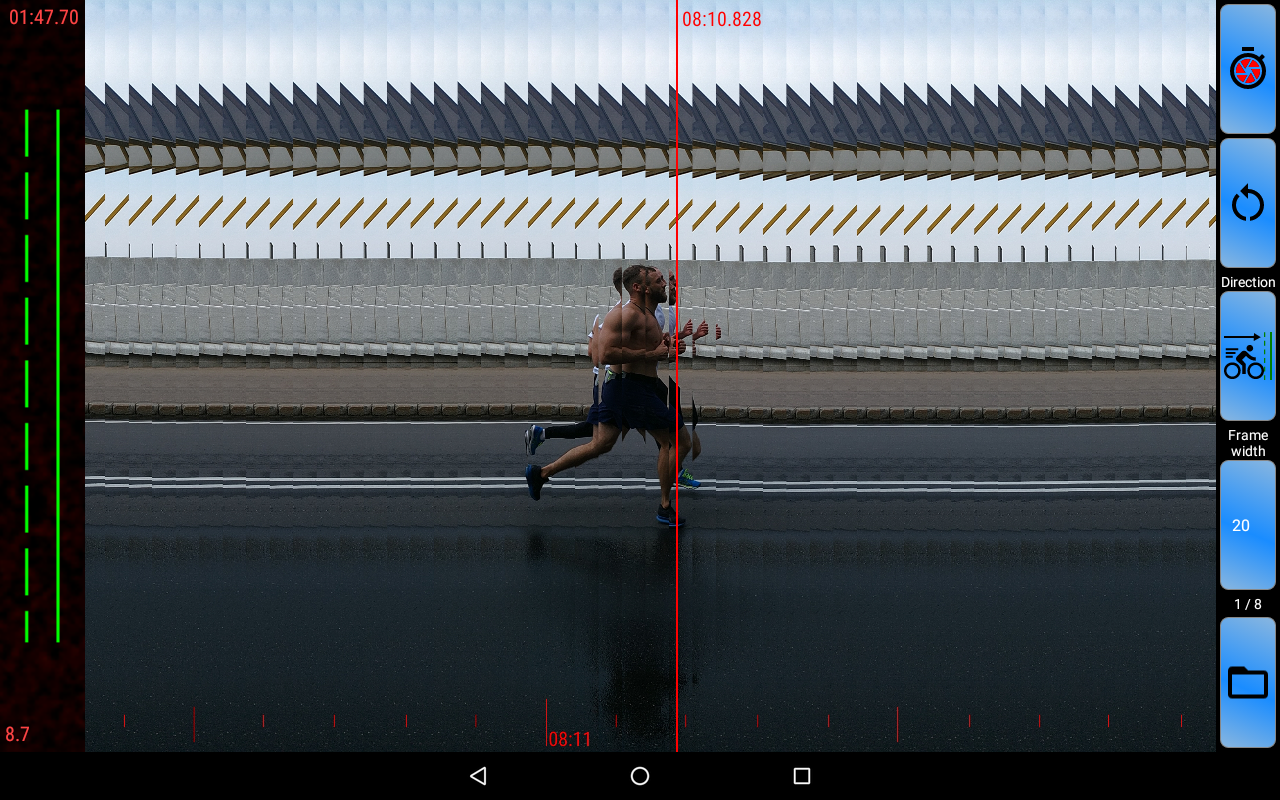
From the starting signal to the last finisher
See the finish, not just a number
A slit-scan image puts movement across the finish line on a time scale. Zoom and scroll to compare close finishes and inspect the frame that matters.
Capture the moment around your tap
The camera keeps recent frames in a buffer. Choose a recording mode and capture the seconds around the finish, including frames before your tap. Queue another result when the next athlete arrives.
Mark every finisher
Add finish flags to the image, read their times and share the marked results. Reopen saved result files to continue your review.
Keep the picture. Replay the action.
Save the photo-finish image and, with video recording enabled, a clip of the finish. Share results for coaching, comparison and a closer look after the race.
One start across several devices
Use server and client modes to share the stopwatch start. Place devices at different observation points with a common time reference; synchronisation requires an internet connection.
Refine your timing setup
Use a recorded frame as the start reference and recalculate result times. Adjust capture direction, slit width, time-scale colours, watermark and camera-latency correction.
Ready for the next finish in three steps
Aim
Keep the camera steady and align the guide with the finish line.
Start
Start the stopwatch at the race start, or use a shared start from another device.
Capture and review
Tap Record near the finish, then scroll, zoom and mark the crossing moments.
Choose the setup that fits your race
Web
Open the beta in your browser with no installation. Use a compatible camera, desktop keyboard shortcuts and local result files. Video export and sharing depend on your browser.
Android
Take the camera to the track. Supported devices offer high-frame-rate capture, volume-button controls, a delayed start, starting sound and flash. Recording modes help you handle individual or grouped finishes.
iPhone, iPad & Mac
Use a mobile setup or review on a larger Mac screen with a compatible external camera. On iPhone and iPad, supported volume controls let you operate the app while the device stays steady.
Available camera modes depend on the device. Some advanced features in the Android and Apple apps require a subscription; check the app for current options.
Your next finish, ready to review
Try Photo-finish in your browser or choose an app for your device.